
 Star on GitHub
How Jev cut the answer time in half for our smart search agent
Most of the Jev demos out there are just simple examples. We put it to use in a production app, and it cut our response time in half.
Starguide is the assistant that answers questions about Serverpod. Ask it how to add a database index, and it reads the documentation, finds the right page, and writes an answer with links to the sources.
This post walks through Starguide’s architecture, how we put Jev to use, and the lessons we learned.
What Starguide is made of
A quick orientation, in case you don't use Serverpod.
Serverpod is an open-source full-stack framework for Flutter, written in Dart. You write your server in the same language as your app. It provides type safety all the way from the database to your app. Starguide is Serverpod’s knowledge base, and it’s, of course, written using Serverpod.
The LLMs have knowledge of Serverpod from their training data, but they don’t know about the latest version or the discussion in which someone solved your exact problem last month. So, for Starguide to provide accurate answers, it needs access to the documentation and other sources of information. But not all of the documentation, discussions, and webpages. That is a lot of context to handle.
Given a question, our LLM builds its answer based on the context provided. Hence, the question becomes how to find the most relevant information to bundle with the query we send to an LLM to stream an accurate answer back. The most common approach is to use retrieval-augmented generation, or RAG, for short.
Searching for documents semantically
We can use LLMs to search for documents semantically, by their meaning, rather than just by keywords. This way, if we search for something like “real-time communication,” we can also find documents discussing “streaming data from the server”.
The most common way to set up RAG is to use a vector database. Luckily, Serverpod includes one out of the box with a pgvector-enabled Postgres instance. We use an embedding model to produce a vector that acts as a lookup key for each document. Similar documents will end up closer in the vector space. And if we generate a vector from our search query, we can find the documents closest to our query. These documents are more likely to contain an answer to the user's question.
So what does the setup actually look like? For each document we want to include, we run two queries to LLMs. The first one creates a summary of the document in something like two paragraphs. The second one sends the summary to the gemini-embedding model, which, instead of returning a text answer, gives us a vector. In our database, we create a row containing the vector (our lookup key), the summary, and the full document.
Now, to search our vector database, we need a vector representation of our search query. We could just send the user’s question to the embedding model, but the results improve if we first normalize the query. We can normalize it by sending it to an LLM and asking it to imagine what the answer would look like in just two sentences. This way, the normalized question more closely resembles the summaries in our database, from which we generated our vectors.
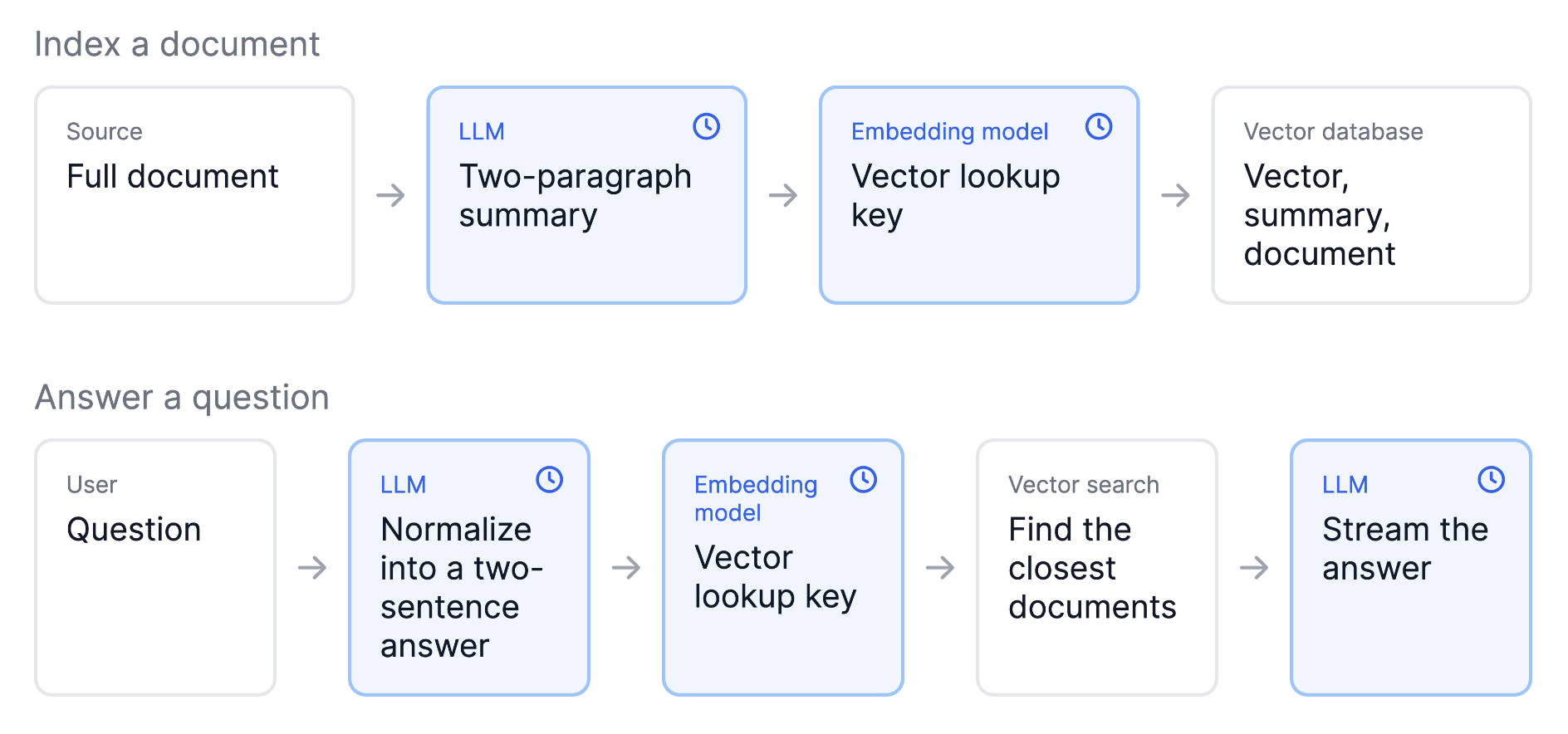
This is how our old document selection method worked. It determined which documents to include in the final query sent to the LLM for generating an answer. First, we normalize the question, then we find the closest documents in our vector database. We include the documents with our original question and send them to the LLM to generate an answer that we stream to the user. It works, but it requires two costly calls to our LLM and a database search before we can even start working on our answer.
What’s Jev, and how can we use it to speed things up?
Jev is a new type of model, and it doesn't generate text. You give it a piece of state, such as a conversation, and ask typed questions. A choice question gets a probability for every option. A noul question gets a single probability for a yes or no statement. Jev can handle up to 255 different options. The answers come back in a fraction of the time a generative model needs, and the queries are dirt cheap.
So, how can we use Jev to speed things up? We have many hundreds of documents. But, if we are a bit smart about how we structure our data, we can comfortably fit the most important documents in a single query to Jev. First, we know that most of what our users ask is answered in our documentation. It’s only in rare cases that it’s hidden in a blog post or discussion on GitHub. However, we still have more than 255 pages in our documentation, so it must be split up. Luckily, we have three very distinct products: The Serverpod framework, Serverpod Cloud, and our low-level web server, Relic. We send the user's question to Jev to determine which product they are likely asking about. Now that we know which product is relevant, we can make a second query to Jev, sending the user’s question along with a short summary of each document as an option. Jev can rank the most relevant documents for the question. We fetch those documents from our database and embed them with the query that we send to our LLM.

This is all well and good if we find the answer in the documents provided by Jev, but what if we don’t find anything relevant? This is when we can still fall back on our old method and do a full search of the site and GitHub discussions using RAG. It takes a few extra seconds, but it still feels like a reasonable tradeoff.
The verdict
Was it worth the change? Definitely, the time to the first streamed token for the final answer was roughly cut in half. This makes the app feel a lot more responsive. As a bonus, we are now also using Jev to check whether our questions were answered, making it possible to quickly fill in gaps in our documentation.