
 Star on GitHub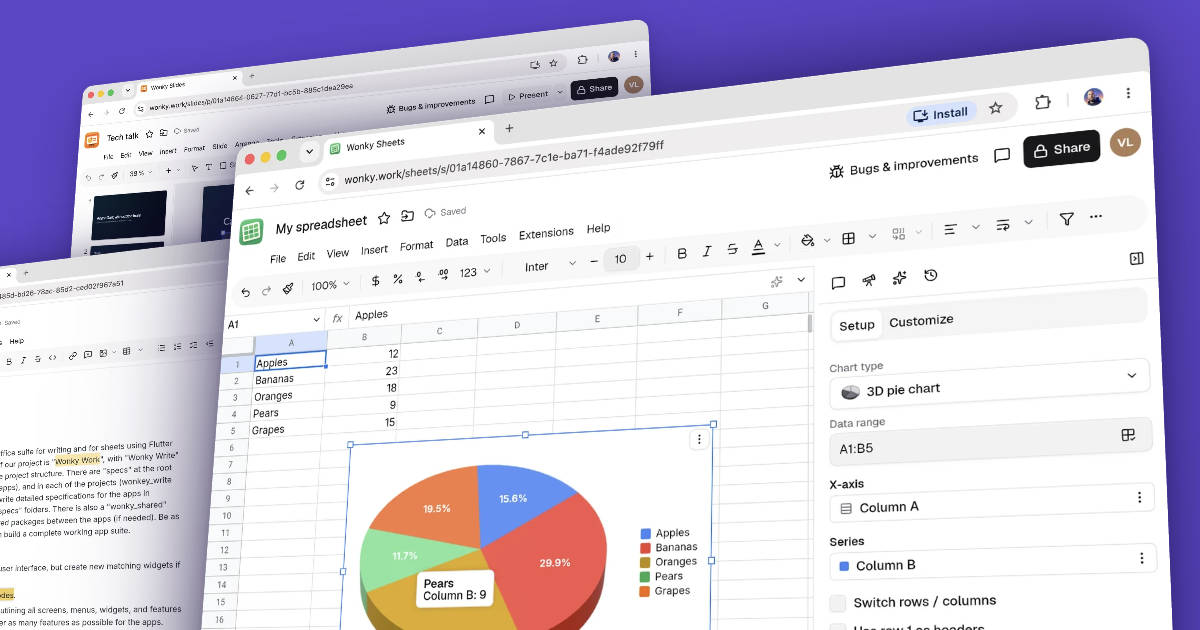
I built a full office suite in a weekend, then I made it improve itself
I went to bed while Claude was building my collaborative writing app. When I woke up, it was still coding. By the end of the weekend, I had the first working version of something I wouldn't normally consider a weekend project. I had a complete office suite with documents, spreadsheets, presentations, and file storage. Not just four pretty demos, but real apps sharing a backend, with real-time collaboration and offline-first sync.
Meet Wonky Work.
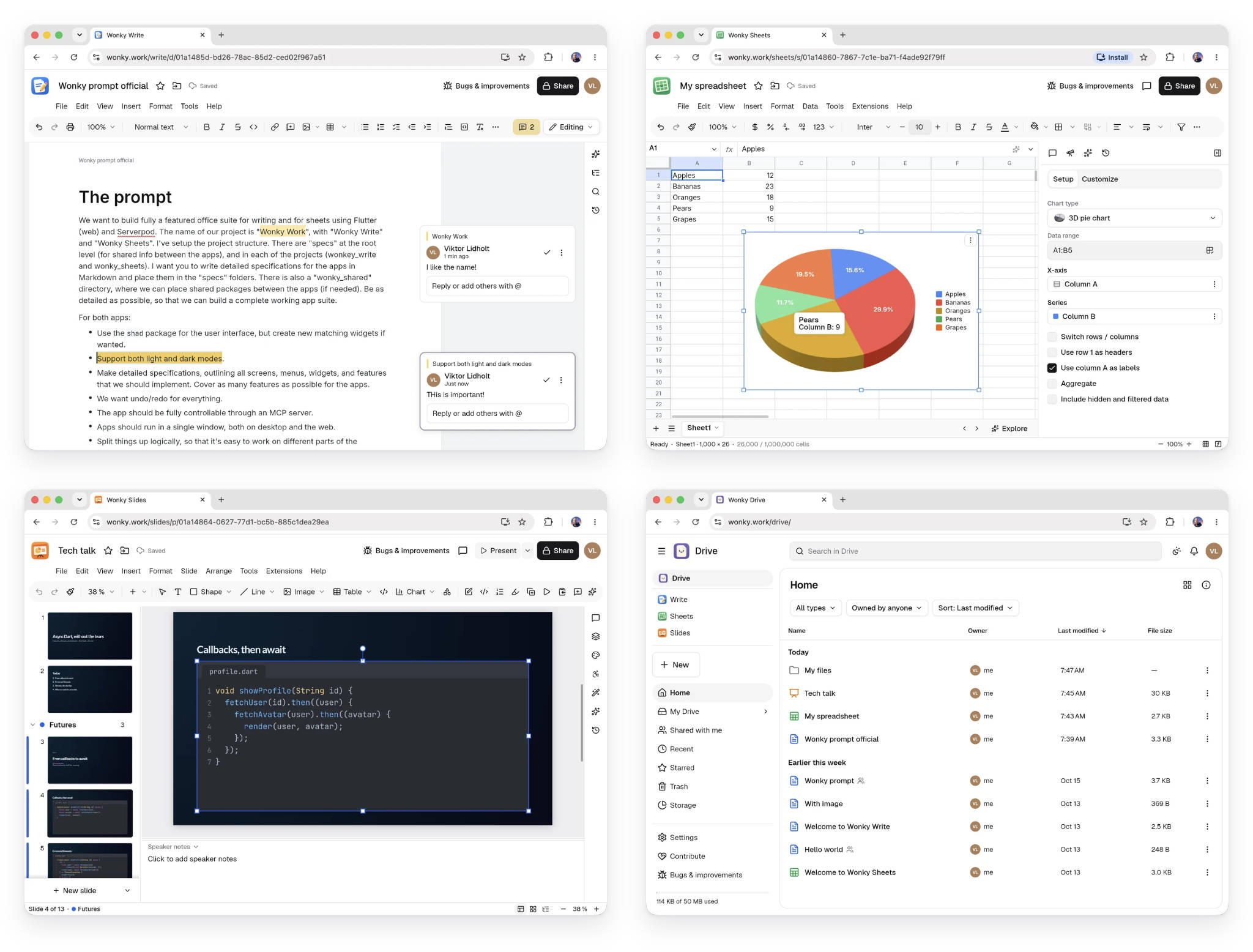
I'd been inspired by the recent wave of AI-built app copies of Adobe's Creative Cloud suite. It made me wonder just how far I could push an AI coding agent. Could I build something on the scale of Google Workspace or Microsoft Office, not just the frontend but the entire stack? Yep. No problem.
The project had grown into a massive codebase, over a million lines of code. A full production build takes almost ten minutes, yet finishing the first working version took just a weekend. So, how was this possible, and what does it take to build something at this scale with AI?
It starts with a good prompt
The obvious answer is AI. But there's a little more to it than asking Claude to build Google Docs. First, you need a really capable model. I used Claude Opus 5.5 on high effort. I don't even want to think about what the API bill would have looked like without a subscription.
Second, you need to give the agent good direction. Choosing the right frameworks, libraries, and architecture makes an enormous difference. I already knew that I wanted to use Flutter for the frontend and Serverpod for the backend. I also picked specific packages for the UI and document editing, rather than having the agent build everything from scratch. The idea was to spend less time reinventing things that already exist, and more time building the actual product.
My initial prompt wasn't asking Claude to write any code. Instead, I asked it to create detailed specifications for two of the apps: Wonky Write and Wonky Sheets. I wanted descriptions of every screen, menu, widget, and feature, organized into Markdown files that could guide the implementation. I also asked it to split the architecture into logical parts, making it possible to work on different features independently.
The prompt included quite a few technical decisions. For Write, I specified the super_editor package, Markdown-based editing, and a collaboration system using Quill-style changes sent over typed Serverpod streams. For Sheets, I wanted to use Serverpod's offline-first synchronization. Both apps should support light and dark modes, comprehensive undo and redo, and eventually be controllable through an MCP server. I also explicitly asked Claude to come up with as many features as possible, while staying within the capabilities of the libraries we had chosen.
Finally, I told Claude to ask clarifying questions before writing the specifications. I wanted us to agree on the important decisions before it started building anything. This is generally a good idea for projects of any size.
Here's the full initial prompt:
We want to build fully a featured office suite for writing and for sheets using Flutter (web) and Serverpod. The name of our project is "Wonky Work", with "Wonky Write" and "Wonky Sheets". I've setup the project structure. There are "specs" at the root level (for shared info between the apps), and in each of the projects (wonkey_write and wonky_sheets). I want you to write detailed specifications for the apps in Markdown and place them in the "specs" folders. There is also a "wonky_shared" directory, where we can place shared packages between the apps (if needed). Be as detailed as possible, so that we can build a complete working app suite.
For both apps:
- Use the
shadpackage for the user interface, but create new matching widgets if wanted.- Support both light and dark modes.
- Make detailed specifications, outlining all screens, menus, widgets, and features that we should implement. Cover as many features as possible for the apps.
- We want undo/redo for everything.
- The app should be fully controllable through an MCP server.
- Apps should run in a single window, both on desktop and the web.
- Split things up logically, so that it's easy to work on different parts of the implementation without interfering with other parts.
For Wonky Write:
- Use the quill format for syncing edits using typed Serverpod streams.
- User package
super_editorfor the text editing. We only need to support the editing features supported by this package.- The editor should primarily work with Markdown (for import/export). No custom styling of the text, except for what's supported in Markdown. We want a "theme" editor though, where we can define all the headlines, bold, italic, code, etc for the Markdown rendering. Also export as PDF (and other relevant formats).
For Wonky Sheets:
- In it's latest version Serverpod has support for offline first sync, so we want to use that for the sheets. Be smart about how you setup tables, with releations, etc. For a working example, check the ../toptap app (although, it's likely simpler than what we need here).
- Implement as many features as possible here, including scripting (give suggestions for how this would work).
Before writing the specs, please ask clarifying questions so we are on the same page with everything.
The first overnight coding session
Claude spent several hours writing detailed specifications for the apps. This gave us a much better starting point than jumping straight into implementation. Once the specifications were ready, I asked Claude to start building the backend and Wonky Write. Then I went to bed.
When I woke up, Claude was still busy coding. I had to ask it to cut a few features to get something running sooner, but after a few more hours, I could finally try the first working version. And it was surprisingly good! Sure, things were missing, and some details needed work. But this wasn't a toy interface pretending to be a document editor. It was already a working application.
I let Claude continue polishing Write and moved on to Sheets. I also decided to expand the project with two additional apps, Wonky Slides and Wonky Drive. It took the better part of the weekend, but by the end, all four apps were up and running. I was genuinely surprised by how well it turned out and by the fact that there were still a few unused tokens left on my Claude 20x plan.
Why the technology mattered
Even with a good AI agent, how was I able to make so much progress so quickly? The answer is hot reload.
As the codebase grew, building the entire suite became painfully slow. A full production build can take close to ten minutes. Imagine waiting ten minutes every time your AI agent makes a small change. Multiply that by hundreds or thousands of changes, and most of your weekend would disappear into compilation.
This is where Flutter and Serverpod really shine. Flutter has hot reload for the frontend, while Serverpod extends that experience across the backend, including code generation and database changes. An agent can modify code, see the results almost immediately, and keep iterating. It's a much faster feedback loop than recompiling and restarting everything after each change.
Serverpod also generates the client APIs and provides type-safe streaming between the server and apps. That removes a lot of the repetitive work an AI agent would otherwise have to do. For Wonky Write, the plan was to synchronize document edits using typed Serverpod streams, while Sheets would take advantage of Serverpod's offline-first support. The implementations evolved from there, with Write using its own collaboration protocol and Sheets and Slides using a revision-based sync engine called RevLog. It's still a complex problem to solve, but starting with the right building blocks makes a huge difference.
And then there's the tooling. Serverpod comes with an MCP server and agent skills, which allow Claude to inspect logs, interact with the running backend, manage database migrations, and figure out why something isn't working. An AI agent is much more effective when it can test its changes and understand what's happening, rather than blindly writing code and hoping for the best.
Finally, choosing good UI and editing libraries made a huge difference. I specified the shad component library for the interface and super_editor for document editing. This gave the agent a consistent design system and a solid editing foundation without having to implement every button, dialog, and text-editing interaction from scratch. None of these choices is particularly magical on its own, but together, they made the ambitious project possible.
The last 10% is 90% of the work
Here's the catch. Even with the best of tooling, what comes out of the agent is never perfect. Getting every little detail to work correctly is still hard. Wonky Work looks surprisingly good and works well overall, but there are still many small issues. The choice of icons may not be the best, there are features that could be more polished, and edge cases that are easy to miss. When you're building four applications at once, those little issues add up.
I could spend the next few months fixing them myself, but that didn't sound particularly exciting. Instead, I started thinking about how AI could help with the next phase of development. What if Wonky could help improve itself, like a self-healing organism powered by its users?
Turning Wonky into a self-improving project
I decided to build an issue tracker and AI-powered contribution system directly into Wonky Work. The idea is simple: users find the problems, AI agents help fix them, and automated checks make contributions easier to review. Rather than having a small team responsible for every last detail, I wanted to make it easy for anyone to contribute, even without knowing the codebase.
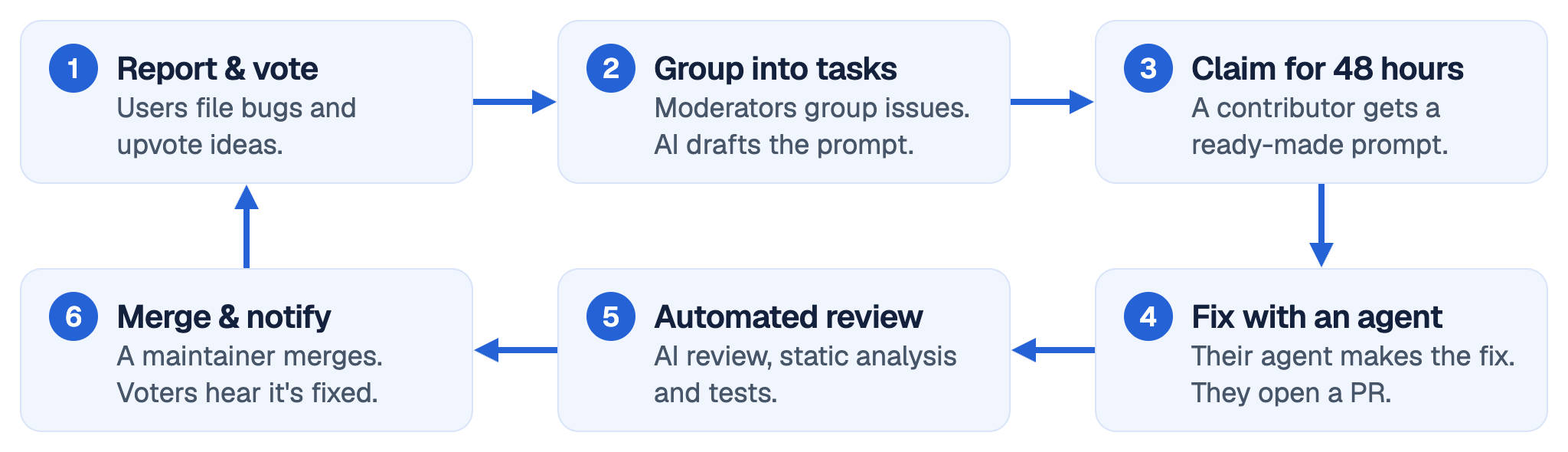
Every Wonky app includes access to a Bugs & improvements board. Users can report problems, suggest features, upvote ideas, and leave comments. The board also helps identify duplicate reports, so votes can be collected around the issues people care about most. This gives us a clear picture of what needs attention and what users actually want.
Moderators can then select issues and group related problems into tasks. An AI model helps write a detailed prompt for each task, complete with context and acceptance criteria. The moderators can review and edit these prompts before publishing them, ensuring that the tasks are well-defined and don't introduce unintended changes.
This is where it gets interesting. Anyone can browse the available tasks and claim one for 48 hours, preventing multiple people from accidentally working on the same thing. They get a ready-made prompt that can be pasted into Claude Code or another coding agent. The prompt points to the relevant specifications and explains exactly what needs to be done. The contributor reviews the changes, tests the result, and opens a pull request on GitHub.
But how do we make sure the submitted code actually fixes the issue without introducing other problems or even malicious code? Wonky has a GitHub integration that checks whether the pull request belongs to a valid, claimed task. An AI reviewer compares the changes against the original acceptance criteria, while automated checks run static analysis, formatting, and tests. The system also looks for unrelated changes that fall outside the scope of the task.
Of course, AI review isn't a guarantee that code is safe or correct. Maintainers still make the final decision before merging. But by combining well-defined tasks, automated validation, and AI-assisted reviews, we can make the process much more scalable. Once a fix is merged and deployed, users who voted for the issue can be notified that it's been resolved.
I find this almost as interesting as building the office suite itself. Traditional open-source projects can have a pretty steep learning curve, especially when the codebase is large. Here, contributors can pick a well-defined task, assign it to their AI agent, and help improve the product with minimal setup.
What happens next?
Wonky Work is still young. There's plenty to improve, and I don't expect AI-generated code to be perfect. But that's part of what makes this experiment interesting. A weekend was enough to get the first version of a surprisingly capable office suite running. Now I want to see how far we can take it with a community of users and AI-assisted contributors.
If you find something that's broken, please report it. You might even be able to get your AI agent to fix it. I wanted to see what one person and an AI agent could build in a weekend. Now I want to see what a whole community of them can do.