
 Star on GitHub
Type-safe everything - Eliminate manual API glue code
Every Flutter app that talks to a backend needs some code you never really wanted to write. That includes an endpoint path, an HTTP request, JSON parsing, and a client model that must match the data defined on the server. None of it is the feature, but all of it has to stay correct.
When you maintain the code that connects to the server by hand, it has to change with the API. Add three fields to a response, and you'll need to update the client model and parsing code before Flutter can use them. Each edit is small, but the server response, client model, and parser all have to stay in sync.
Serverpod, an open-source backend written in Dart for Flutter, takes a different approach. You define each model once, and Serverpod generates the model classes and serialization code for both your server and Flutter app. It also generates type-safe client methods from your endpoints. Those generated types let the Dart analyzer catch type errors before you run the app.
In this article, we'll build a ride fare estimator, call it from Flutter, and then modify its API. We'll see which parts of that change we need to write, which parts Serverpod generates, and how the analyzer catches a mismatch.
How Serverpod connects the server and Flutter
For our fare estimator, the app sends a pickup location and a destination. The server calculates the price and returns it with a currency code for Flutter to display.
A model describes the data your app sends or receives. An endpoint contains the Dart methods that your app can call on the server.
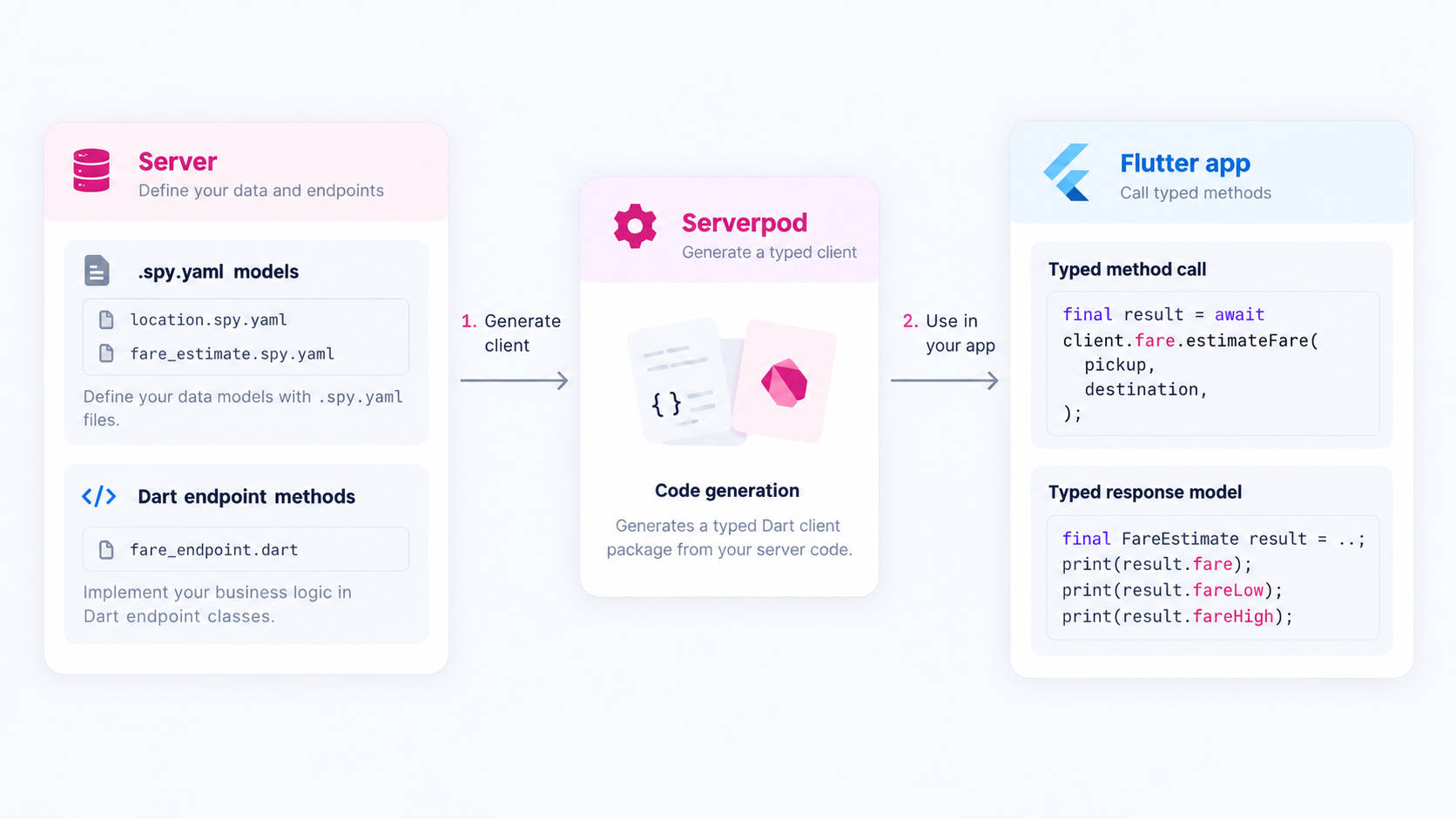
The serialization code turns Dart objects into a format that can be sent between the app and server. It turns received data back into Dart objects. Flutter calls the endpoint through a generated client method.
Before we start
If you haven't installed Serverpod yet, follow the installation guide. Then create a project:
serverpod create tripquote
Keep the recommended defaults during setup.
The project contains three packages. Here are the parts we'll use, including the fare files we'll add next:
tripquote/
├── tripquote_server/lib/src/fare/   # Models and endpoint we'll add
│   ├── location.spy.yaml
│   ├── fare_estimate.spy.yaml
│   └── fare_endpoint.dart
├── tripquote_client/               # Generated client code
└── tripquote_flutter/lib/main.dart # Flutter code
Open the tripquote directory, then start the project:
cd tripquote
serverpod start
Keep it running while you follow the tutorial. Serverpod watches your models and endpoints and regenerates the connecting code when they change.
Build the fare estimator
The fare estimator needs a pickup location and a destination. Start by defining a Location model for both.
Model definitions go in .spy.yaml files. Create tripquote_server/lib/src/fare/location.spy.yaml with:
### A geographic point.
class: Location
fields:
  ### Degrees north of the equator.
  latitude: double
  ### Degrees east of the prime meridian.
  longitude: double
Next, define the estimate that the server will return. Create tripquote_server/lib/src/fare/fare_estimate.spy.yaml with:
### What a ride is expected to cost.
class: FareEstimate
fields:
  ### The estimated fare.
  fare: double
  ### ISO currency code, such as USD.
  currency: String
With these models in place, let’s create an endpoint to calculate the estimate. We'll use a base fare of USD 2.50 plus USD 1.20 per kilometer.
Create tripquote_server/lib/src/fare/fare_endpoint.dart with the following code. The helper functions calculate the distance and round the fare to two decimal places:
import 'dart:math';
import 'package:serverpod/serverpod.dart';
import '../generated/protocol.dart';

/// Estimates what a ride will cost.
class FareEndpoint extends Endpoint {
  /// Returns an estimate for a ride from [pickup] to [destination].
  Future<FareEstimate> estimateFare(
    Session session,
    Location pickup,
    Location destination,
  ) async {
    const baseFare = 2.50;
    const pricePerKm = 1.20;

    final distanceKm = _distanceKm(pickup, destination);
    final fare = baseFare + distanceKm * pricePerKm;

    return FareEstimate(fare: _round(fare), currency: 'USD');
  }
}

/// The great-circle distance between two points, in kilometers.
double _distanceKm(Location start, Location end) {
  const earthRadiusKm = 6371.0;
  final latitudeDelta = _toRadians(end.latitude - start.latitude);
  final longitudeDelta = _toRadians(end.longitude - start.longitude);
  final a =
      pow(sin(latitudeDelta / 2), 2) +
      cos(_toRadians(start.latitude)) *
          cos(_toRadians(end.latitude)) *
          pow(sin(longitudeDelta / 2), 2);
  return 2 * earthRadiusKm * asin(sqrt(a));
}

double _toRadians(double degrees) => degrees * pi / 180;
double _round(double value) => (value * 100).round() / 100;
The Session parameter gives the endpoint access to server features such as logging and the database. It stays on the server, so Flutter only needs to send the two locations.
Call the endpoint from Flutter
When you save the endpoint from the previous section, Serverpod generates client.fare.estimateFare. It accepts two Location objects and returns a Future<FareEstimate>.
The template already sets up client in tripquote_flutter/lib/client.dart. Keep that file unchanged.
Create tripquote_flutter/lib/screens/fare_screen.dart with:
import 'package:flutter/material.dart';
import 'package:tripquote_client/tripquote_client.dart';

import '../client.dart';

class FareScreen extends StatefulWidget {
  const FareScreen({super.key});

  @override
  State<FareScreen> createState() => _FareScreenState();
}

class _FareScreenState extends State<FareScreen> {
  late final Future<FareEstimate> _estimate;

  @override
  void initState() {
    super.initState();

    _estimate = client.fare.estimateFare(
      Location(latitude: 6.5244, longitude: 3.3792),
      Location(latitude: 6.4281, longitude: 3.4219),
    );
  }

  @override
  Widget build(BuildContext context) {
    return Center(
      child: FutureBuilder<FareEstimate>(
        future: _estimate,
        builder: (context, snapshot) {
          if (snapshot.hasError) {
            return const Text('Could not load the fare.');
          }

          final estimate = snapshot.data;
          if (estimate == null) {
            return const CircularProgressIndicator();
          }

          return Text(fareLabel(estimate));
        },
      ),
    );
  }
}

String fareLabel(FareEstimate estimate) {
  return '${estimate.currency} ${estimate.fare}';
}
In tripquote_flutter/lib/main.dart, replace the greeting-screen import with:
import 'screens/fare_screen.dart';
In MyHomePage, replace body: const GreetingsScreen(), with:
body: const FareScreen(),
In MyApp, change the home-page title:
home: const MyHomePage(title: 'Fare estimate'),
Keep the rest of main.dart, including await initializeClient(), unchanged.
The call to client.fare.estimateFare sends the pickup and destination to the server. The returned FareEstimate has typed fields, so our fareLabel function can read currency and fare directly.
Keep the server running and hot restart the Flutter app by pressing R in the serverpod start terminal. A successful request for these locations displays:
USD 16.54
You don't write an HTTP request, specify an endpoint path, or maintain a matching model in Flutter. Serverpod generates the code needed to transfer the data between the app and server.
The endpoint's documentation also appears in the generated client. Hover over estimateFare in your editor to read the description from the server code.
Add more data to the response
Suppose the app now needs to show a price range and tell the rider when surge pricing applies. It should still show a single fare when surge pricing does not apply.
Try replacing the fare
A first approach is to replace fare with two range fields. Replace the contents of tripquote_server/lib/src/fare/fare_estimate.spy.yaml with:
### What a ride is expected to cost.
class: FareEstimate
fields:
  fareLow: double
  fareHigh: double
  currency: String
Save the model, leaving the endpoint and Flutter code unchanged. Wait for serverpod start to process the change.
The Dart analyzer now reports errors in the server endpoint and the Flutter app:
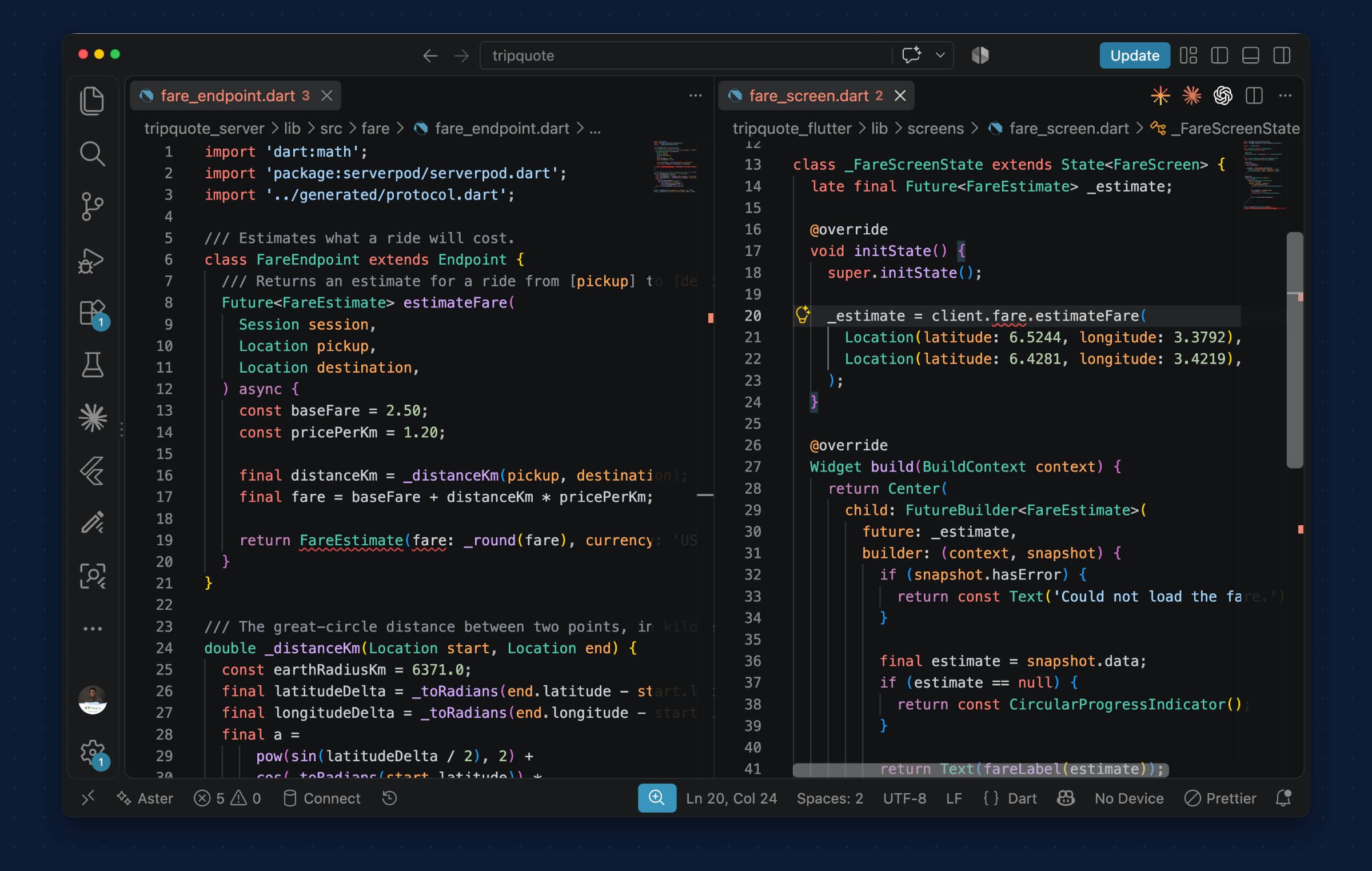
Now update the endpoint to match the model. For this example, set the low price 10% below the estimate and the high price 15% above it. In tripquote_server/lib/src/fare/fare_endpoint.dart, keep the distance and fare calculations inside estimateFare. Replace only its return statement with:
    return FareEstimate(
      fareLow: _round(fare * 0.9),
      fareHigh: _round(fare * 1.15),
      currency: 'USD',
    );
Save both files and wait for serverpod start to finish regenerating. Leave the Flutter code unchanged.
The Dart analyzer now flags estimate.fare in fareLabel:
The getter 'fare' isn't defined for the type 'FareEstimate
The generated FareEstimate no longer has fare, but our Flutter code still reads that field. The analyzer reports the mismatch before we run the updated app.
The first attempt removed a value the app still needs for ordinary pricing. We'll keep fare and add the extra information alongside it instead.
Keep the fare and add optional details
Replace the contents of tripquote_server/lib/src/fare/fare_estimate.spy.yaml with:
### What a ride is expected to cost.
class: FareEstimate
fields:
  ### The estimated fare, adjusted when surge applies.
  fare: double
  ### ISO currency code, such as USD.
  currency: String
  ### The low end of the fare range.
  fareLow: double?
  ### The high end of the fare range.
  fareHigh: double?
The new fields have values only when surge pricing applies. The ? allows them to be null otherwise. The response always includes fare.
We'll use priceSurge to turn surge pricing on or off in this example. When it is true, the server doubles the fare before calculating the range.
In tripquote_server/lib/src/fare/fare_endpoint.dart, replace the FareEndpoint class with the code below. Include the priceSurge line above the class, and keep the imports and helper functions unchanged:
bool priceSurge = false;

/// Estimates what a ride will cost.
class FareEndpoint extends Endpoint {
  /// Returns an estimate for a ride from [pickup] to [destination].
  Future<FareEstimate> estimateFare(
    Session session,
    Location pickup,
    Location destination,
  ) async {
    const baseFare = 2.50;
    const pricePerKm = 1.20;

    final distanceKm = _distanceKm(pickup, destination);
    final fare = baseFare + distanceKm * pricePerKm;

    if (!priceSurge) {
      return FareEstimate(fare: _round(fare), currency: 'USD');
    }

    const surgeMultiplier = 2.0;
    final surgeFare = fare * surgeMultiplier;

    return FareEstimate(
      fare: _round(surgeFare),
      currency: 'USD',
      fareLow: _round(surgeFare * 0.9),
      fareHigh: _round(surgeFare * 1.15),
    );
  }
}
Save the model and endpoint files. After regeneration, estimate.fare is valid again. The two new fields are also available in Flutter.
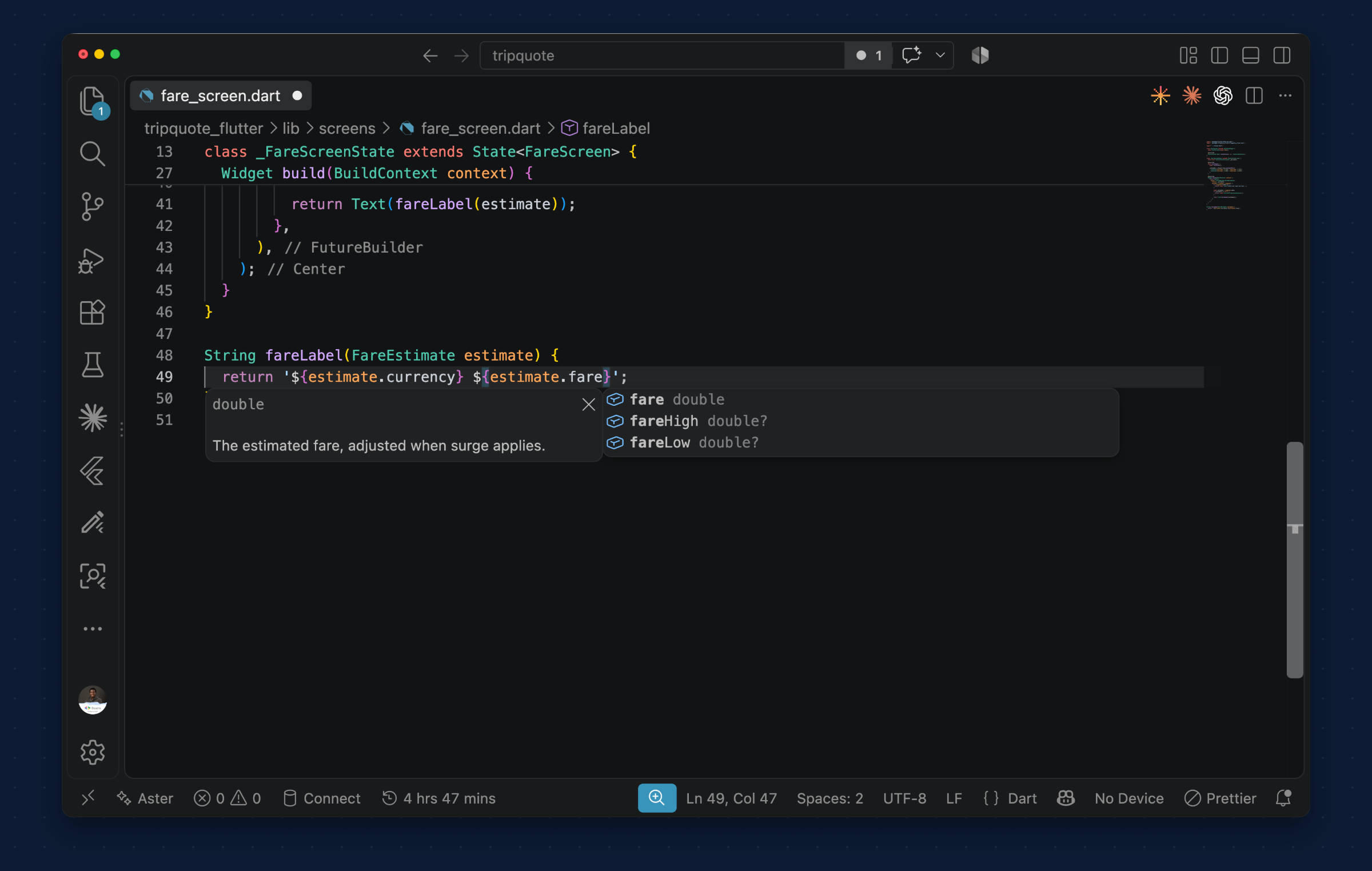
Display the new fields in Flutter
In tripquote_flutter/lib/screens/fare_screen.dart, replace only fareLabel. Keep the client setup, request, and widget unchanged:
String fareLabel(FareEstimate estimate) {
  final low = estimate.fareLow;
  final high = estimate.fareHigh;

  if (low != null && high != null) {
    return '${estimate.currency} $low to $high\nSurge pricing';
  }

  return '${estimate.currency} ${estimate.fare}';
}
When both range values are present, the display shows the range and indicates that surge pricing applies. Otherwise, it shows the single fare.
With priceSurge set to false, restart the server and Flutter app. The screen shows:
USD 16.54
Set priceSurge to true, then restart both again:
USD 29.77 to 38.05
Surge pricing
Restarting the server applies the changed flag. Restarting Flutter makes a new request.
The request stayed the same. We updated the model definition, pricing logic, and Flutter display. Serverpod generated the corresponding model classes and conversion code on both sides, along with the code that connects the endpoint to Flutter.
You write the contract. Serverpod generates the plumbing.
The same process works with more than the numbers and strings used in the example above. Enums, lists, maps, nested models, byte data, and UUIDs are a few of the other supported types. The model documentation covers the full set.
Conclusion
The code that connects your Flutter app to its backend has to be right. Maintaining it still takes time away from the feature you're building, even with help from a coding agent. Serverpod reduces that maintenance, while the Dart analyzer helps catch type errors before you run the app.
To apply the same approach to another feature, learn how to call Google APIs from a Serverpod backend.
Happy coding!