
 Star on GitHub

Ready to ship? Serverpod Cloud now publishes to iOS and Android
Today, we're introducing mobile app publishing with Serverpod Cloud! Serverpod Cloud can now build your Flutter app for iOS and Android and help you get it into the hands of your users, through Apple's TestFlight and Google Play.
Until now, Serverpod Cloud has made it easy to deploy and manage your backend and web app. With this release, we're extending that experience to the rest of your application. Your cross-platform releases can now be managed together, from one project.
From building apps to shipping them
Flutter makes it possible to build beautiful, native applications for multiple platforms from a single codebase. Together with Serverpod, you get a complete full-stack Dart development experience, with everything from authentication and databases to real-time communication and server-side logic.
But building an app and getting it into users' hands are two different challenges. Publishing mobile apps involves native compilation, signing, build pipelines, store credentials, and distribution. Even when your app is ready, there's still work between your code and the first person installing it.
We think developers should be able to spend more time building their products and less time managing the infrastructure around them. That's why we're bringing mobile builds and publishing into Serverpod Cloud.
What's new
Build for iOS and Android with Serverpod Cloud
Serverpod Cloud now handles Flutter mobile builds through a managed build process. Connect your app, configure the platforms you want to target, and let Serverpod Cloud take care of the build pipeline.
Under the hood, an automated workflow manages your whole build process. It compiles your Flutter applications for their target platforms, so you don't need to set up and maintain your own mobile CI/CD pipeline just to get started.
As part of the same release flow, you can build for multiple platforms:
- iOS: deliver builds to TestFlight, where you can test your app before submitting it for App Store review.
- Android: publish builds through the Google Play workflow.
- Web: publish to web as you did before.
All your releases in one place
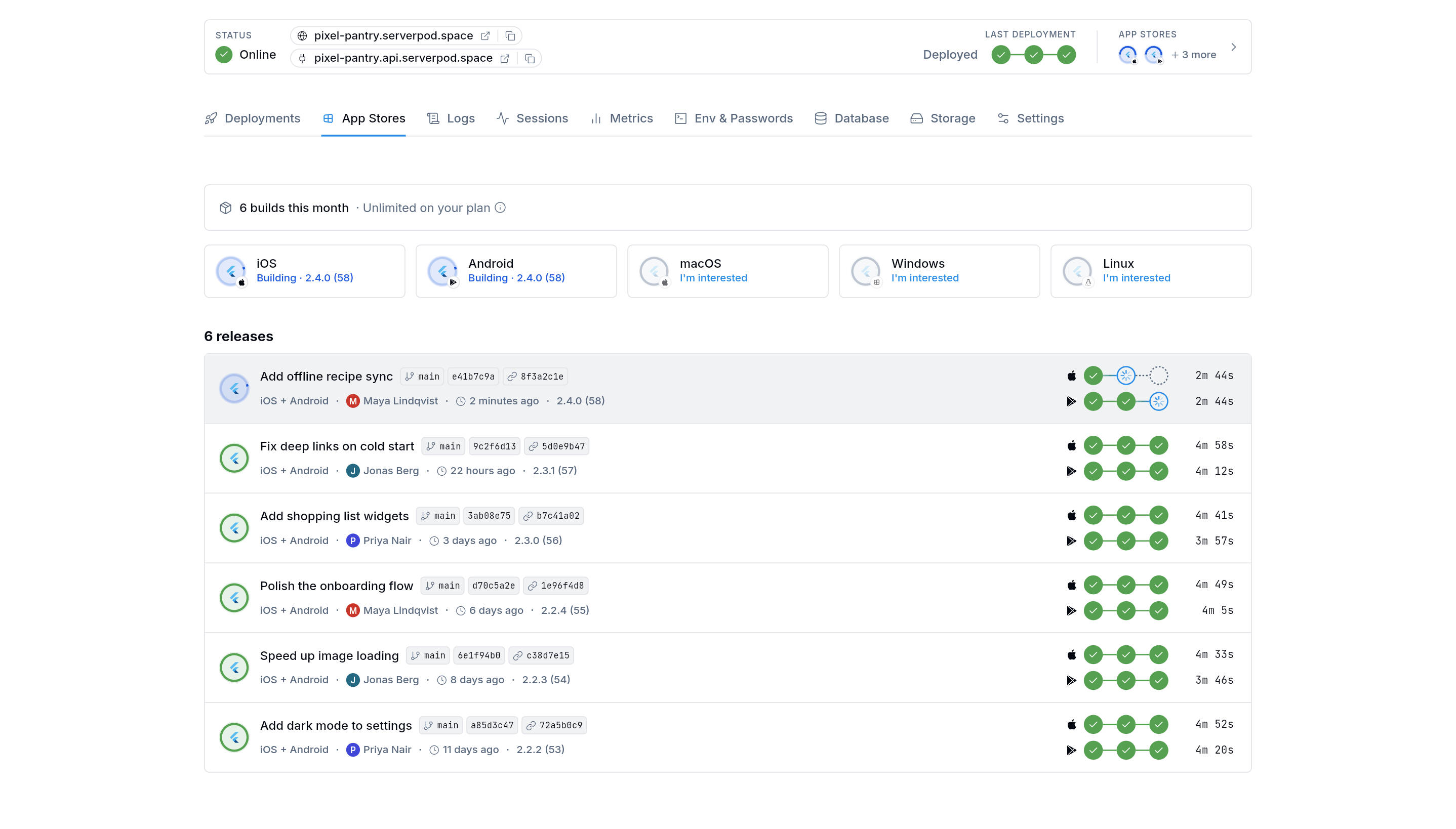
We're also introducing a new App Stores view in the Serverpod Cloud console. The new view App Stores brings you an overview of the platforms so you can see in one glance the status of your client applications:
- Your iOS builds
- Your Android builds
You can follow the status of your releases, see what's happening during a build, and inspect individual steps and logs when something needs attention. Whether you're deploying a backend update or preparing a new mobile version, you have one place to see what's happening across your application. The Deployments tab continues to give you full visibility into your backend.
A guided setup for mobile publishing
Your first mobile release needs a few things that only Apple and Google can give you: a developer account, an app record, and the credentials that let Serverpod Cloud sign and upload your app on your behalf.
The Serverpod Cloud console walks you through this. When you click Set up for iOS or Android in the App Stores tab, it tells you what it needs, where to find it in App Store Connect or the Google Play Console, and where to add it. You do this once, and every release after that reuses the same setup.
Managing your builds from the CLI
Once setup is done, all it takes is a single command:
serverpod cloud app publish
The command uploads your code. Serverpod Cloud builds your app for every platform you've configured and delivers the builds to your own store accounts: TestFlight for iOS and a Google Play testing track for Android.
While it runs, you can follow each build's progress and read its logs, from the CLI or in the App Stores tab of the console. If a build fails, the logs show which step failed and why, so you can fix it and run the command again.
How to publish your Flutter app
Here's what the typical journey looks like when you're ready to get your app onto mobile devices.
- Prepare your project
- Connect your store accounts
- Start your build
- Follow the release
- Test, submit and share it with your customers
You're on the App Store! Time for a high five.
What you need to know
Mobile publishing comes with some platform-specific requirements. You'll need the appropriate Apple and Google developer accounts, and your app must meet the requirements of each platform. Serverpod Cloud manages the build and distribution workflow, but it doesn't replace Apple's or Google's review and approval processes.
For existing Serverpod Cloud users, your backend deployment workflow remains available. Mobile builds extend the ways you can release your application, rather than replacing how you deploy your server.
We're continuing to improve the experience, including making the build process easier to follow and expanding support for different project configurations. For detailed setup instructions and platform requirements, see our documentation.
Mobile publishing is included on every Serverpod Cloud plan. The Starter plan includes 5 builds a month, and all other plans have unlimited builds under fair use.
A build is one release across your platforms: one command that delivers the same version of your app to iOS and Android. A build counts toward your limit if it succeeds on at least one platform, so builds that fail everywhere don't count.
One project, from backend to app stores
This release is another step toward making Serverpod a complete platform for building and shipping applications. Flutter gives you the freedom to target multiple platforms from one codebase. Serverpod gives your application a powerful Dart backend. And now, Serverpod Cloud brings deployment, builds, and release management together.
Whether you're building your first application, working with AI coding agents, or maintaining a production Flutter app, we want the path from development to distribution to feel like a natural part of the same workflow. The goal is simple: spend more time building something valuable, and less time figuring out how to ship it.
And we're not stopping here. iOS and Android are the first stops, and we plan to add more of the platforms Flutter supports over time. Is there a platform you'd like to ship to next? macOS, Windows and Linux are already listed in the App Stores tab: click I'm interested on the one you want, so we know where to go next.
Ready to ship?
If you've already built something with Flutter and Serverpod, now is a great time to take it to the next step. Head over to Serverpod Cloud, configure your mobile platforms, and get your app ready for its first users.
Get started with Serverpod Cloud
We can't wait to see what you ship!