
 Star on GitHub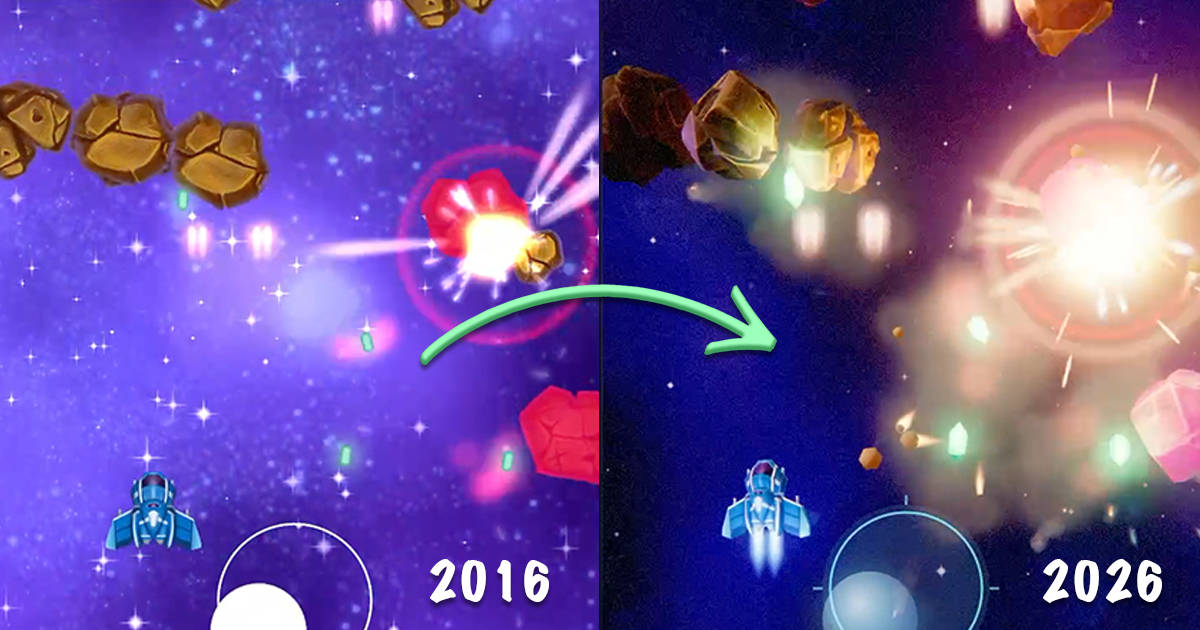
Remastering the world's first Flutter game in 3D
In 2016, I wrote SpaceBlast, the very first Flutter game, while working on the Flutter team at Google. Two years later, the game was featured in the keynote of the 1.0 Flutter release to showcase the framework’s rendering abilities. Writing the original game probably took a week or two. Now, it took just a single day to remaster it to modern Flutter. And, boy, has a lot happened in the past ten years. Here are the two versions of the game side by side.
SpaceBlast 2016 vs 2026 side by side.
If you want to try it out, you can play SpaceBlast 2 directly in your browser. You can also still play the old game.
Here is how I brought SpaceBlast up to date and how you can build your own game.
Converting the assets to 3D
I wanted the remastered game to keep the feel of the original, just making everything better and in 3D. A bit like how Nintendo has kept the style and feel of the original Super Mario while modernizing their games.
As a first step, I needed to get the assets from their 2D sprites to 3D models. I tried a few different tools and approaches. For most of the sprites, what worked best for me was using the Meshy T2 model. It is specifically made to create low-poly models. As the ship and the enemies in the game are rather small, we don’t need too much detail. I set the polygon count to 300 for the models. Meshy can export the models in GLB format, which is what we want for our game.
For the asteroids in the game, using the original images as a reference for Meshy did not yield good results, as they came out really flat and odd-looking. To improve their quality, I first used Nano-banana to reimagine them as 3D rendered images. A tip for transformations like this is to place all the sprites in a single image at once. This way, you are more likely to get consistent results.
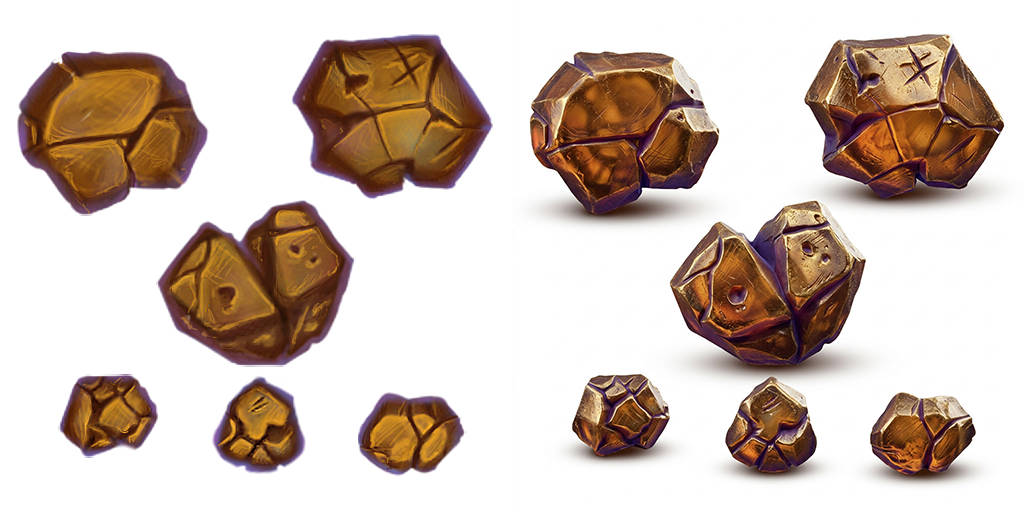
The original asteroids were reimagined as 3D-rendered by Nano-banana before being passed to Meshy T2.
The 3D assets generated by Meshy T2 had a low polygon count, but the textures were absolutely huge. Especially considering how small they are when displayed in the game. To fix this, I put all the assets in a folder and opened them up in Claude. I asked Claude to optimize the GLB files and to make their sizes match the sprites in the original game. The crystals and power-ups did not turn out great in Meshy, so I asked Claud to create new models for them. Claud did a decent job, but they don’t match the original game as well as the other assets.
To get a quick check of what all the new 3D models would look like in the game, I asked Claude to whip up a sheet of all the assets. This way, I could see that everything was up to snuff before I started building.
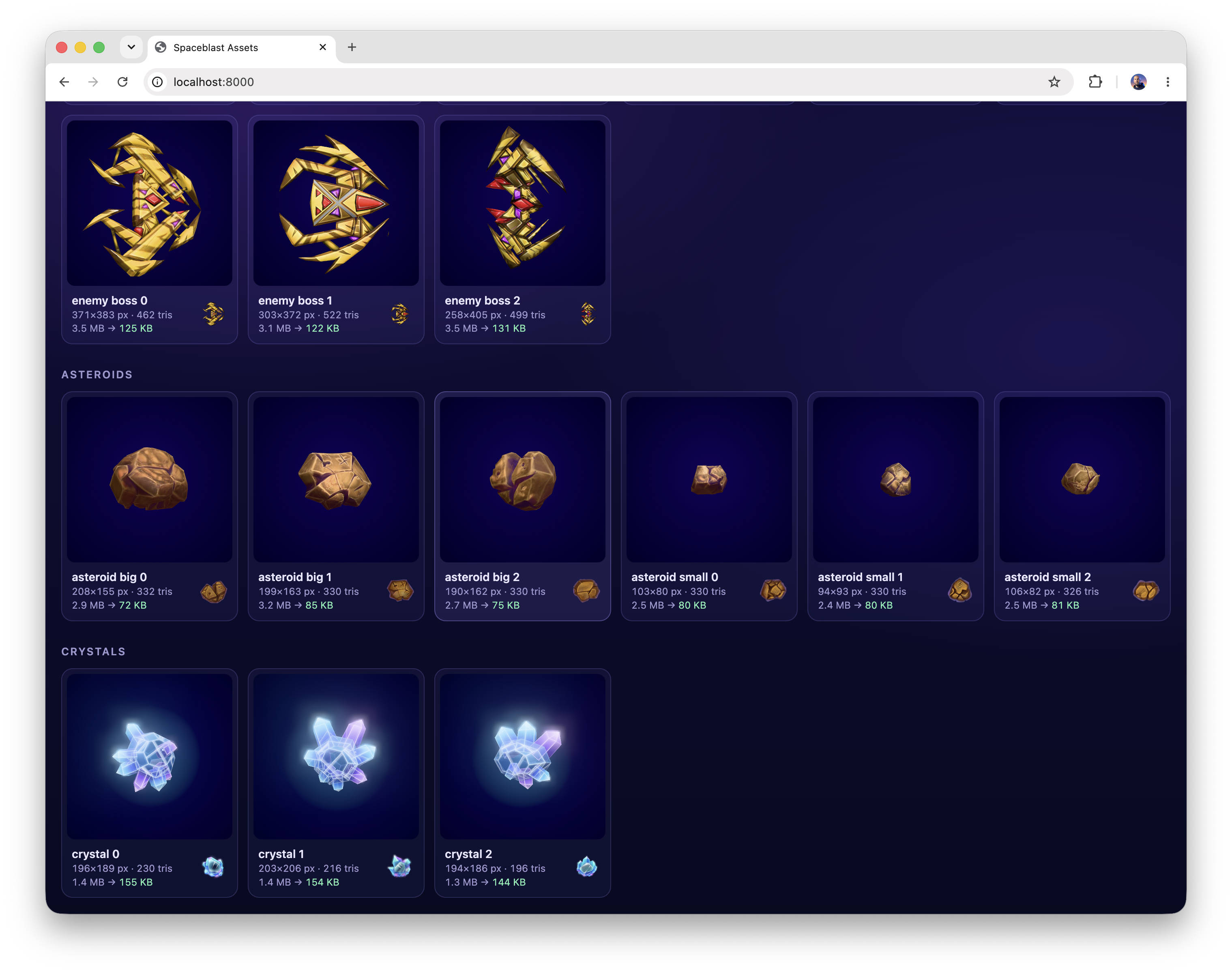
A preview of all the 3D models.
Building the game
With all of the assets in place, it was time to start building the new version of the game. Instead of just using an empty Flutter project as the starting point, I created a new Serverpod project. There are two reasons for this. First, Serverpod sets up a great environment for agentic coding. It comes with AI agent skills and MCP servers, all configured out of the box. The second reason is that when the game is done, I can just publish it to Serverpod Cloud. Even though this game doesn’t have a backend, Serverpod Cloud is great for hosting Flutter web apps. It comes with a built-in fast CDN and all the necessary configurations in place. And who knows, maybe I want to build a high score list or some other backend feature in the future.
To build the actual game, I used Claude Code with Opus 5.5. Serverpod already installs the Flutter skills, but for 3D, I used the excellent flutter_scene package. To get the skills for flutter_scene, I first added it to the pubspec.yaml, then ran dart run skills@ get.
To get the best results, we want to give the AI agent as much good context and reference material as possible. I like to create a reference directory in the project, where I place the material in a structured way. In this case, I provided the full old game, its assets, the original game engine, and all the new 3D models we created.
This is the full prompt I used to create the first version of the remastered game.
Let’s build a 3d version of “SpaceBlast” a 2d Flutter game built with SpriteWidget. We want to build it with flutter_scene, targeting all platforms but primarily Flutter web. The full 2D game is in reference/spaceblast and SpriteWidget is available in reference/spritewidget . We want to replicate the gameplay perfectly but make it 3D. It shoud be AAA quality. 3D models and sprites are availabe in the spaceblast2/spaceblast2_flutter/assets directory.
Some important considerations: - Replicate the gameplay perfectly, we are still using the same 2D logic and the same level designs. - Just build the game for now, no server connection, we're going to work on that later. - Make it look stunning like a professional game. I'm thinking particle explosions, fog, depth of field, stuff like that. - Where we don't have 3d assets, let's use the 2d assets from the old version of the game (or if you can programatically do them really good looking do that). I'm thinking of the parallax background, etc. - The "start" screen needs a redesign, but should have the same functionality as before. Perhaps we see a scene with the player’s spaceship from another angle that transitions into the game when we tap the play btton. - Primary target is Flutter web (currently running through `serverpod start`). - All game logic should happen on a fixed frame rate of 60 fps. - In the reference directory we also have the original game assets (reference/spaceblast_assets) plus our new 3D models and a project that renders them. It’s straight forward, but the crystals are having some bloom that we want to use in our game, so take inspiration from there. - Keep the mobile first aspect ratio of the original game, but make something a bit more interesting for the borders (but not too distracting from the game). Like a matching dark gradient that has some slight animation and perhaps changes with the gameplay (e.g., bosses).
Let's go. Make an awesome game! Do not stop until you are done.
I pressed the submit button and went out lindy hop dancing while Claud Code was puttering. What I saw when I came back blew me away. The full game was working close to perfectly. I didn’t agree with all the stylistic choices Claude made, and it probably took about half a day to get it to a state I was happy with.
At the end of the day, this little journey made me quite excited to start building games again. And it shows how far Flutter has come, not just as a toolkit for creating productivity apps, but also for serious game development.